
In endpoint management, stale devices are endpoints that still sit in your inventory but have stopped checking in with the platform that manages them. They look managed, they count toward every report, and nobody has heard from them in weeks. The inventory describes a fleet that no longer quite exists — and the gap widens a little every month that nobody checks.
No IT team decides to let the inventory drift. It happens one device at a time. A leaver hands in a laptop, and it goes into a drawer instead of back to IT. A meeting-room PC loses its network cable. An agent stops starting after an update. A machine leaves the building for repair and comes back weeks later. Each event is small and ordinary, and none of them sends an alert.
Why Stale Devices Skew Your Reports
An endpoint inventory records what has reported in, not what exists. As long as every device checks in, the two match. When devices go quiet, the inventory keeps their last known state, even though it may no longer be current.
That breaks three things IT relies on.
Coverage numbers. Patch and configuration reports divide by the number of devices in the inventory. A device that has not reported for two months still counts, carrying whatever state it had when it went quiet. The report can look better or worse than the fleet really is, and nobody can tell which.
Exposure. A device that stops checking in can no longer reliably receive the updates and policy changes delivered through its management platform. If it genuinely sits unused in a drawer, the immediate exposure stays low. If someone still uses it — off the network, with an agent that no longer starts — it is the least protected machine you own, and the one your reports know least about.
Audits. An auditor who asks for the list of managed endpoints expects that list to match the hardware. Every stale record becomes a question you answer by hand, usually the week before the audit.
The software side of the inventory shares the weakness, because you can’t patch what you can’t see: a record stays only as current as the last time the device reported it.
How to Find Devices Not Checked In for 30 Days
Finding stale devices takes a fixed rule, not a one-off cleanup. Four steps keep the rule honest:
- Pick one threshold and keep it. Thirty days is a practical starting point: long enough to cover a normal holiday, short enough to catch a lost laptop while someone still remembers who had it. Treat it as a review threshold, not proof that anyone has abandoned the device. Allow for longer absences, such as parental leave, before you treat a device as lost.
- Use last check-in, not online status. Online or offline describes this moment. Last check-in describes the past month. A device can sit offline over a weekend and still be healthy; a device whose last check-in was in August needs a closer look.
- Run the list on a schedule. The same day every month turns the list into a trend. A list that grows from five devices to twenty tells you something about your leaver process or the health of your agents.
- Treat the list as a queue, not a delete list. Every device on it needs a decision, and the right decision depends on why it went quiet.
What to Do With Each Device on the List
Most stale devices fall into one of four groups, and each group needs a different action:
- Still in use, agent not reporting. The riskiest group. Find the device, repair or reinstall the agent, and confirm that it checks in again. Until it does, assume the platform cannot keep it current.
- Parked or forgotten. A laptop in a drawer, a spare in a cupboard, a leaver’s device that never came back. Recover the hardware and decide whether it returns to the pool or retires.
- Rebuilt under a new identity. If a tool registered the rebuilt machine as a new record, the old record is a duplicate. Remove it so your reports count the machine once.
- Retired. The hardware no longer exists. Remove the record and note the retirement in your asset register, so the next audit has an answer.
The inventory tells you which device went quiet and when. Who last had it usually comes from your leaver process or your asset register, so keep both close to the list.
Disable before you delete wherever your tools allow it. A false positive costs little to undo while the record still exists, and a lot once it disappears.
How CapaOne Keeps One Machine as One Record
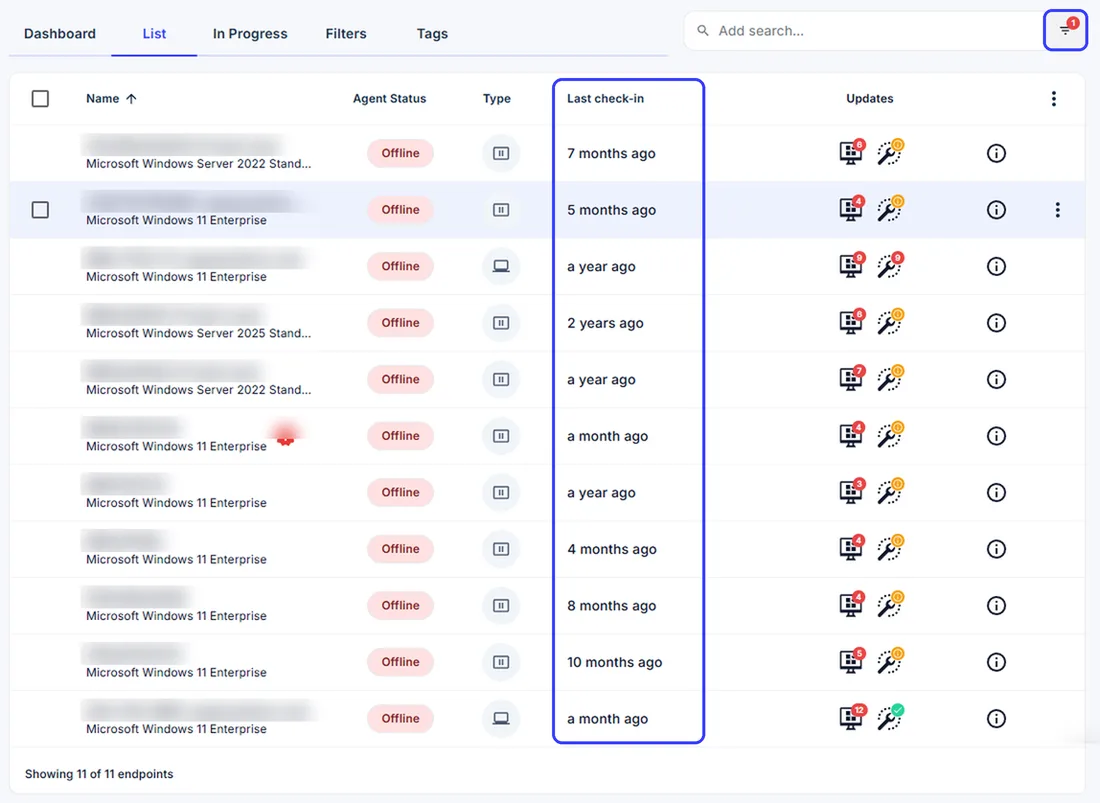
The CapaOne Endpoint Management Platform shows when each Windows endpoint last checked in, next to its agent status, in the endpoint list. IT can filter that list — for example, on every endpoint that has not checked in for 30 days — and export the result to CSV for the asset register or the audit file. CapaOne keeps the filter in the page URL, so the monthly check can live in a single bookmark.
CapaOne builds its reports from the latest inventory each endpoint has sent, and its documentation is explicit that endpoints that have not checked in recently may have stale data. That is why Last Check-in sits next to every endpoint. CapaOne also blocks deletion while an endpoint is online, so a cleanup cannot remove a device that is actively reporting.
When a machine enrolls, CapaOne creates a hardware hash and identifies the machine by it. Each machine therefore exists as one record. That keeps the fleet count behind endpoint asset management tied to real hardware, and it means the reports you hand to management describe the fleet you actually run.
Stale Devices With or Without Intune
CapaOne works with Microsoft Intune, or entirely without it, and the stale-device routine works the same way in both setups.
Organizations that run Intune have a cleanup feature of their own. Intune device cleanup rules hide devices that have not checked in for a set period between 30 and 270 days, and a preview lists the devices a rule affects. The rules hide records in Intune; they do not remove the devices from Microsoft Entra ID.
Directory-side duplicates are a separate case. Microsoft’s guidance on stale devices in Entra ID lists duplicate device objects after an OS reinstall, reimage, or recovery as a common sign of stale devices, and recommends disabling a device for a grace period before deleting it. Inside CapaOne, the hardware hash keeps each machine as one record, whatever happens to its directory object.
Make the Check a Monthly Habit
A stale-device list that runs every month changes what the inventory is for. The coverage numbers describe the devices that actually report. The device most likely to miss updates shows up as a name on a list instead of as a surprise during an incident. And the audit question about managed endpoints has an answer that already exists.
Start this month: pull every device that has not checked in for 30 days and sort it into the four groups. Book a demo of CapaOne Endpoint Management Platform to see the endpoint list and the 30-day filter, or start a free trial and run the check on your own fleet.